This is the pattern I find myself in day after day while practicing TDD or BDD.
Saturday, May 5, 2012
Friday, April 27, 2012
What’s new in ApprovalTests.Net v.19?
- EmailApprovals
- Better Rdlc Syntax
Email Verification
Almost every site sends some sort of email. These have been hard to test, usually requiring some sort of email to be actually sent. Now you can simply say:EmailApprovals.Verify(new MailMessage())
This is particularly nice with a[UseReporter(typeof(FileLauncherReporter))]
As it will open in your desktop email client (like outlook, not gmail) making it very easy to see the results. If you’ve given up on desktop clients, you can grab one from www.ninite.com
I made a video about it here:
Better Rdlc Support
Previously, if you wanted to approve a Rdlc report with multiple data sources you had to use Tuples, which got a bit annoying. In this release I am taking advantage of the anonymous enumerator syntax. The result is 1: RdlcApprovals.VerifyReport(reportname, assembly,
2: new DataPairs() { { "DataSet1", model1 }, {"CompanyAddress",model2} });
1: RdlcApprovals.VerifyReport(reportname, assembly,
2: new Tuple<string,object>( "DataSet1", model1), new Tuple<string,object>("CompanyAddress", model2);
Happy Testing!
Tuesday, April 10, 2012
What’s New in ApprovalTests .Net v.18?
- FrontLoadedReporter
- IEnviromentAwareReport Upgrades
- CodeCompareReporter
- DictionarySupport
- EF and Mvc3 additions
- Bug Fixes
FrontLoadedReporter Attribute (For Build Systems)
You can now add the following code to your assembly.[assembly: FrontLoadedReporter(typeof(NCrunchReporter))]This is only allowed at the assembly level, and must be a IEnvironmentAwareReporter. If the reporter is allowed in the current environment, it will circumvent all other reporters. This is very useful for Build Systems where you want to override the behavior of the reporters.
IEnvironmentAwareReporter is file specific (better composition)
The IEnvironmentAwareReporter interface has changed frombool IsWorkingInThisEnvironment();to
bool IsWorkingInThisEnvironment(string forFile);
this allows for better composition of reporters. For example I can now combine DiffReporters that only do text with DiffReporters that do images. If you have an Image it will fall thru to the ImageReporter even if the TextDiff Program is on your system.
This is especially nice for…
CodeCompareReporter
My new favorite text diff tool is Code Compare, mainly because it integrates directly into Visual Studio 2010. You can download it here (it’s free)Dictionary Support
var map = new Dictionary<string, string>(){ {"Caption", "Mal"}, {"Pilot", "Wash"}, {"Companion", "Inara"} }; Approvals.VerifyAll(map);
This will now create the expected approval result. I don’t know how this didn’t exist from the very start. It is worth noting that keys will be presented in their natural ordering (to allow consistency.)
EF and Mvc3
I added a Mock Saver, LambdaLoader & SingleLambdaLoader to the Enitity Framework support.I also added .Explict to the Mvc3 Toolkit. I will make videos about this approach soon.
Bug Fixes
There were 2 bugs that got fixed this round.64-bit machines didn’t launch 32-bit Reporters.
XUnit Reporter didn’t invoke the right Equals Method.
Both are fixed now.
Wednesday, March 21, 2012
Testing Difficult Code
I recently did 3 videos in my ‘Using ApprovalTests in .Net’ series that deal with how to test difficult code. These video actually have very little to do with either .Net or ApprovalTests, but they are common issues you run into when unit testing.
Seams
Testing difficult Code comes down to 2 things:
- Can I call the Method?
- Will the Method run to completion?
And there are 2 techniques I use to deal with these, that individually are useful, but together are amazing.
1. The Peel
The hardest part about long methods is you have to run all of it to test even a small part of it. The idea behind the peel is to break the method up into easy to run pieces. Here’s the video:
2. The Slice (Mocks)
Even if you get into the piece you are looking to test, you might not be able to get all the way through it. That’s where mocks come into place. By slicing off the connection to the actual trouble spot, you can easily fake it, and return to easy to run code.
3. The Peel & Slice
So now that you have these Mocks, how do you get them to be used? While there are many forms of dependency injection (inheritance, factory, DI frameworks, IoC) the easiest of all is “Parameter passing”. Of course, to do that you need a nice seam that passes in the default dependency. Sound familiar? This is why the Peel & Slice work so nicely together.
Friday, January 27, 2012
Creating Namers
Check out this namer for ideas how to make your own.
Saturday, December 31, 2011
Using Reporters in Approval Tests
Why Use Reporters?
I assume that you have tried out Reporters if you are reading this blog, however, just to get us started, I’ll remind you that a Reporter is called when an ApprovalTest fails. The three reasons for using different types of reporters are as below.Visualizing Results
The output of a failed ApprovalTest can range from simple (a text file) to complex (*.png, *.html, *.mp3, etc…) If you get a *.html file, then you do not usually want to see the ‘page source’ output, rather you can usually more easily view (and approve) a HTML-rendered view. Because of this, you might want to decorate your class or method with[UseReporter(typeof(FileLauncherReporter))]Comparing Results
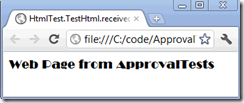
Of course, not only do ApprovalTests Reporters tell you the results, but also the results can help you determine what has changed since they last passed. While the screenshot above will help you to understand what the web page LOOKS like, it won’t help you to figure out why the test is no longer passing. To get more granular information, you may want to use a different Reporter, such as the DiffReporter. Output is shown below.
[UseReporter(typeof(DiffReporter))]Approving the Results
The last reason to use a particular Reporter is to make the ability for you to approve the dersired output of the test easier. The DiffReporter is most often used for this, because you can just right click in your particular differencing tool (TortoiseMerge is shown above, BeyondCompare, WinMerge or KDiff can also be used) and approve the output ‘approve whole file’.
In this release of ApprovalTests, I’ve added a new reporter to increase the flexibility of approving. That reporter is called the ClipboardReporter and here is how it works. Rather than launching the output in any tool, this reporter creates the command-line output needed so that you can move the results file to the approved file quickly. It automatically adds this command to your clipboard:
[UseReporter(typeof(ClipboardReporter))]Simply open a command prompt and past the contents of the clipboard in to the command prompt window to approve the file.
How to use Reporters
In the release, we have added the ability to decorate an assembly (C# only), class or method with multiple reporters. This is easy to do, just add the reporters of interest to the level, separated by commas. The current list of reporters is as follows:
| C# Reporters | Java Reporters |
| BeyondCompareReporter.cs ClipboardReporter.cs DiffReporter.cs FileLauncherReporter.cs ImageReporter.cs MsTestReporter.cs MultiReporter.cs NotepadLauncher.cs NUnitReporter.cs QuietReporter.cs WinMergeReporter.cs | ClipboardReporter.java DiffReporter.java EnvironmentAwareReporter.java ExecutableQueryFailure.java FileLauncherReporter.java FirstWorkingReporterChain.java GenericDiffReporter.java ImageDiffReporter.java ImageWebReporter.java JunitReporter.java MultiReporter.java NotePadLancher.java QuietReporter.java TextWebReporter.java TortoiseDiffReporter.java WinMergeReporter.java |
Here is the code example for the scenario described above, i.e. both HTML (browser) and Diff (source comparison) using Tortoise Diff.
1: using ApprovalTests.Reporters;
Happy testing!
Thursday, July 21, 2011
Testing Rdlc Reports
Edit [4/25/2012] There is now a video on testing Rdlc Reports as well
Rdlc reports are a very common thing with many .Net projects. They are a convenient way to both show data, and produce printable pages. I have seen many of these when working with legacy code, and wanted to share how to test them.
Approval Tests offer a wide array of convenience methods to test rdlc reports. I’m going to build from the most common, to the most robust.
Scenario 1: Rdlc report, backed by a single dataset, all in the same project.
This is probably 95% of existing rdlc reports. In this example I have a project with rdlc report printing out the best insults from the insult database we use to teaching kids T-SQL at www.teachingkidsprogramming.org
It is all in a single project, the rdlc file is an embedded resource and then uses a Dataset called InsultsDataTable.
The great thing about testing rdlc reports is with approval tests is it’s still the single line you would expect....
Approvals.ApproveReport( reportName, reportData);
The report name is easy, it’s just a string for the location of the embedded rdlc file. The reportData might be a bit harder to recreate. Of course you can always dummy up the InsultsDataTable object by hand, if you are particular about the text of any given field, but I find often I am not, so we added a connivence extension method to DataTable to automatically add a dummy row to it. If you want multiple rows, just state how many. For example: .AddTestDataRows(42)
Here’s the Code
Approvals.ApproveReport("ReportingDemo.InsultsReport.rdlc",
new InsultsDataTable().AddTestDataRows());
when you do this, it will create render the rdlc report to a tiff file (I usually use the DiffReporter for viewing) and show you the output, simply approve it (I usually copy the move command from the console and run it in a command window).
Scenario 2: Being explicit and the datasource name
There was a lot of assumed knowledge in the previous step, let’s start with the name of the datasource. What if you want to state the name directly? Well, it’s basically the same code, except that you will now add the name
Approvals.ApproveReport( reportName, reportDatasourceName reportData);
Of course, who can remember those names ( I always try to fill in “Model” for mine to have uniformity, but then again we are talk about legacy code which is rarely uniform). What I usually do is pass in a blank string “”, and let the error message guide me.
This will produce the following exception:
System.Exception : The Datasource Name '' is not a legal match for ReportingDemo.InsultsReport.rdlc, Legal Matches are: [Model]
See, this report datasource should have been “Model”. This is especially useful when there are multiple datasource (below).
Scenario 3: Rdlc is in a separate assembly from the datasource
So far we have been assuming that the datasource is in the same assembly as the embedded rdlc file. This is not always the case. If they are in different assemblies, we need to specify which assembly to look in. There are a couple of ways to do get the assembly, but I prefer using a class I know to be in the same assembly.
typeof(KnowClassFromAssembly).Assembly
again, here's the method signature:
Approvals.ApproveReport( reportName, rdlcAssembly,
Scenario 4: Multiple Data Sources
The last case is when there are multiple datasource, in this case you need to make tuples for each pairing.
Here's the code:
Approvals.ApproveReport("ReportingDemo.InsultsReport.rdlc",
typeof (KnowClassFromAssembly).Assembly,
Tuple.Create("Model", new InsultsDataTable().AddTestDataRows()),
Tuple.Create("Address", CompanyInformation.Instance));
So now you have everything you need to easy get those rdlc reports under tests.
Have fun testing!
Llewellyn Falco
Note: there is a slight variation between the Page size of a PDF and a multipage Tiff.
If your report is very tight to the page, the page rendering might be different.


