Thursday, July 3, 2014
What's new in ApprovalTests.Net v3.7
Wednesday, June 18, 2014
What's new in ApprovalTests.Net v3.6
VerifyNoAbandonedFiles
Asp Scrubbers
Scrubbers are simple Functions that take a input string and return a clean version of it. Here's an example to remove the GUID used by asp for forms
SimpleLogger.Mark
StatePrinterApprovals
Rest Calls
VerifyJson
Serializable Theory Test
WindowRegistry.Asserts
WriterFactory
ApprovalDataScenarios
Monday, July 8, 2013
What’s new in ApprovalTest.Net v 3.0?
Here’s what’s new:
Version 3.0 – The final version
Versioning with signed packages is always a bit of a pain. It’s made things harder to deal with when I release new versions. Thanks to Simon Cropp, I was introduce to JSON.net's model for version numbers which solves it. You can read all about it here, but here’s the short version- ApprovalTests & ApprovalUtilities will be v 3.0 from here on out.
- Nuget Version numbers will be actual version, and will continue to evolve.
[Contributors: Simon Cropp]
GitHub improvement & bug fixes
One of the nice things GitHub provides is issue tracking. As such many issues suggested where fixed including:- Rdlc Reports with External Images
- Approvals.VerifyPdf(file)
- Xunit & Mspec Support
Please continue to add issues as you find them.
[Contributors: James Counts & Simon Cropp]
HtmlScrubbing
I found that asp.net pages were giving me some issues with generated keys, so I added a scrubber you can use if you need to. You can view the code here..gitattributes suggestions
Line endings are a pain for everyone, but git’s solution of switching them makes things worse for ApprovalTests. Fortunately, Jake Ginnivan came up with a very nice solution of setting the approved files to binary with removes this problem. Simply add: *.approved.* binary
to your .gitattributes[Contributors: Jake Ginnivan]
Saturday, May 25, 2013
What I've learned about open source by pairing with Simon Cropp
Think about your 'brand'
Often I am writing ApprovalTests because I use ApprovalTests myself. I am happy that others find it useful as well and believe in sharing and open source, so I also make it an open source project. However, all of my thinking goes into after a programmer has it on their computer. However, there is a lot of things that happen before someone has ApprovalTests on their computer. Most of what I am about to talk about is specific to this area of open source. In the 8 hours we paired, we spent surprising little time actually programming C#.It works on my computer
Git and binary files
Removing Cruft
Consistency
Version Numbers and Signed Code
- create a solution level file for the version number
- add it to packages via link (there is a drop down on add)
- Manually change your .csproj file to move it into your properties folder
Properties\VersionInfo.cs - Use this when creating your nuget with the -Version flag
1 .dll per Nuget
Think long term
More to come...
- Continuous Integration Server - I'm a big believer in this on regular projects but it seemed like overkill when I was the only committer. I just had to remember to always run my tests. But there is an other advantage here. I keeps me aware of at least 2 machines, meaning it will be easier to think of other people who clone the repo.
- Website - On top of moving the website to github, and using a static website generator like jekyll. I am also aware of needing to structure my website to guide people to Understanding the Code, Using the Code, and Browsing the Code. A very nice example of this in the NancyFx Page.
- Documentation - This includes what goes in the blog vs into a wiki. The main difference being that wiki should be relevant next year, while a blog is relevant NOW and not so important next year.
Tuesday, February 5, 2013
What's new in ApprovalTests.Net v.22 ?
Here's what's new:
UTF8 Support
GitHub
ORM Support
- NHibernate
- Entity Framework DbContext (V 4.1+)
Async
P4Merge and better path finding
CLS complaint
Contributors
Wednesday, September 19, 2012
What’s New in Java ApprovalTests V 0.12
My thanks go out to John Heintz for helping me to create this.
Here's a video of the whole thing:
Unit Testing HadoopMapReduce
Before we go into the details of everything involved in HadoopMapReduce, let’s go through an overview of how we’ve been testing our MapReduce jobs. In this example, we are doing this common demonstration of a word count MapReduce job. The idea is that sentences will come in, they will be split into words, count them up, and summarize in our reduce job.Visualizing the System
Unit Testing provides many different advantages to a programmer. And all of them have different importance to different people, but one of these advantages is specification. In particular, with MapReduce, being able to understand the flow and transformation of the data can be more enlightening than the other aspects of Unit Testing.One of the things that we strive to do with ApprovalTests, is create output that is meaningful and insightful. To demonstrate this, I’m going to start output of my word count unit test.
WordCountTest.testMapReduce.approved.txt
|
| [cat cat dog] -> maps via WordCountMapper to -> (cat, 1) (cat, 1) (dog, 1) -> reduces via WordCountReducer to -> (cat, 2) (dog, 1) |
Here is the entire line to create that output:
HadoopApprovals.verifyMapReduce(new WordCountMapper(),
new WordCountReducer(), 0, "cat cat dog");
Easy right? Let’s look into the parts.MR Unit
HadoopApprovals sits on top of MR Unit . You will need to grab it and include the jars. The javaDocs for HadoopApprovals mention all of the jars needed to run it. They are:- hadoop-client-1.0.3.jar
- hadoop-core-1.0.3.jar
- hadoop-test-1.0.3.jar
- log4j-1.2.15.jar
- mockito-all-1.8.5.jar
- mrunit-0.9.0-incubating-hadoop1.jar
HadoopApprovals
HadoopApprovals has three main functions: the ability to test the mapper, the reducer, and the map reduce combination. To make this easier, we are going to use extra information with the generics called SmartMappers and SmartReducers. We will talk about those in the next section.Testing a Mapper
Here’s the method to test the mapper:verifyMapping(SmartMapper mapper, Object key, Object input)
To test a mapper, you need the mapper you’re going to test and the keyValue pair going in. Many times, mappers do not actually use the key that comes in, but regardless, you will need one anyway. Do not make it null.
Testing a Reducer
Here’s the method to test the reducer:verifyReducer(SmartReducer reducer, Object key, Object... values)
When testing a reducer, you will need to pass in the key plus a set of values for the key. You will notice you can pass in regular strings and regular integers instead of Text and LongWritable. Again, this is because of the SmartMappers we will talk about in the next section.
Testing a full MapReduce job
Here’s the method to test the MapReduce:verifyMapReduce(SmartMapper mapper,
SmartReducer reducer, Object key, Object input)
As you might expect, this is almost identical to testing a mapper. Except with the extra addition of a reducer.
SmartMappers
I wrote a blog about getting generic type information at runtime from Java. You can read it here:The long a short of it is, if you add an extra interface to your mapping and reducing jobs, you can avoid a lot of boiler-plate code needed to state what the runtime types of the input and output are. You can do this by simply having your MapReduce jobs extend SmartMapper instead of Mapper.
Fair point. If you want to test against an existing mapper or reducer, and you don’t want to change it to use the SmartMapper extensions, you can always wrap it using the MapperWrapper (bonus: fun to say out loud) or ReducerWrapper. Here’s a sample of how to do that:
SmartMapper mapper = new MapperWrapper(new WordCountMap(),
LongWritable.class,
Text.class,
Text.class,
LongWritable.class);
Once you do this, you will no longer need to wrap all your inputs in the writable classes, HadoopApprovals will wrap primitives into the appropriate context for you.
Thursday, August 9, 2012
What’s new in ApprovalTests.Net v.20?
ASP routing support
As community contributor, Krzysztof Koźmic said in his NDC talk …explicit so that the item can now be tested
var urls = new[] {"/Home/Index/Hello", "/"}; AspApprovals.VerifyRouting(MvcApplication.RegisterRoutes, urls);
In the sample above, the delegate (MvcApplication.RegisterRoutes) will be invokes against a mock route collection, and then fed the URLs provided. A sample output would look like this:
/Home/Index/Hello => [[controller, Home], [action, Index], [id, Hello]] / => [[controller, Cool], [action, Index], [id, ]]
Event approvals
Similar to the example above, another aspect of code which is often hidden (or implicit) is which events are wired-up to your form. This can be particularly troublesome when changing an existing, unfamiliar piece of code. For example, it it easy to accidentally remove a button-click event.Event approvals allows you to easily lock down existing events which are associated with an object or a form. To do this, simply call the following:
EventApprovals.VerifyEvents(myObject);
This new method will only allow you to verify events which are directly associated to the object which is passed in. Unfortunately, many times you don’t want to say ‘What are the events associated with this button"? rather you actually want to say ‘What are the events associated to this form, even though the button is on the form and the event is associated to the button (rather than the form)?’ This is now no problem, since we took this scenario into consideration and also created a convenience method for the latter scenario.
To test all the events on a form and its immediate children, simply call code as shown below:
WinFormsApprovals.VerifyEventsFor(new DemoForm());
WPF support for Controls
It’s always been possible to test WPF windows with a simple:WpfApprovals.Verify(window);
This would render the window to a .png image and verify against .approved file.
But sometimes you want to scope smaller to an individual control. Unfortunately, we had previously neglected this scenario – no longer! You can now test an individual WPF control with the same call as shown below:
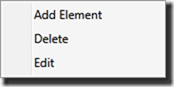
var menu = new ContextMenu(); menu.Items.Add(new MenuItem() {Header = "Add Element"}); menu.Items.Add(new MenuItem() {Header = "Delete"}); menu.Items.Add(new MenuItem() {Header = "Edit"}); menu.IsOpen = true; WpfApprovals.Verify(menu);
This code will produce a *.png image, such as the one shown below:
Entity Framework support
People have long pondered how to test Entity Framework. We have talked about this before, but previously testing EF with ApprovalTests had always required a large number of steps. Now you can test EF by simply callingusing (var db = new ModelContainer()) { EntityFrameworkApprovals.Verify(db, CreateCompanyLoaderByName2(db, "Mic")); }
This method will implement a ‘test-the-weather’ scenario which will verify the resulting SQL without the need to be able to connect to a database. However, if this method fails, then it will connect to referenced database and will execute the generated query and will return extra information about WHY the test failed. I plan to create more detailed tutorials on the inner workings of this new method soon.
Let’s give you one more look at this method signature.
public static void Verify<T>(ObjectContext db, IQueryable<T> queryable)
Email support for attachments
Previously, we added the methodEmailApprovals.Verify(message);
Unfortunately, when the email message contained attachments, then the GUIDs that those attachments created caused issues with test output because they were not consistent over multiple test runs. This bug has been fixed in this release. To learn more about approving email messages, watch this video.
FileLauncher with DelayReporter
There has been a great deal of demand to use Cassini-dev after Jim Counts demo’d it during his ASPConf video on testing ASP.MVC views. Unfortunately, when using this method it’s a bit tricky to use a file launcher, since the web server dies BEFORE the browser can hit it. We came up with a simple solution which adds a tiny delay into the method execution so that this is no longer an issue.[UseReporter(typeof(FileLauncherWithDelayReporter))]
Well, that’s all for this release. As always, if you have any questions about ApprovalTests, tweet them with the hashtag #ApprovalTests, I monitor that and will answer you promptly.
Happy testing.
Sunday, July 22, 2012
Tooling stack of testing Asp.MVC Views
“Craftsmen know their tools”
At last weeksWhile I am always happy to see more ApprovalTesting in the world, I was also impressed with the full tooling stack Jim used throughout the presentation.
Here’s the List
| CassiniDev | Inline webserver |
| NCrunch | Continuous Test Runner |
| GitHub for Windows | Source Control |
| CruiseControl.Net | Continuous Integration |
| TortoiseDiff | Diff Viewer (part of TortoiseSVN) |
| Code Rush | Productivity Enhancement for Visual Studio |
| NuGet | .Net Package Manager |
It was great to see this level of professionalism in a demo session; an area usually reserved for cowboy programming of hello world demos. Don’t get me wrong, Jim still does a simple “Hello World” type demo, but he applies all the rigor and professionalism I would want in a real project to that example.
Nicely done Jim, you’ve inspired me to raise my game, and hopefully others as well.
Saturday, July 14, 2012
What’s new in Java ApprovalTests v.011
Approvals.Approve() => Approvals.Verify()
I finally got around to fixing an early mistake in my naming convention. Approvals.Approve() is now deprecated, and Approvals.Verify() is the new way to verify your result.Mac OsX Diff Reporter Support
To help support my friends on the Mac Side, I have added a whole bunch of reporters for them. Including:- DiffMergeReporter
- KaleidoscopeDiffReporter
- TkDiffReporter
Machine Dependent Testing
If you have multiple environments, which render things differently, you can now use the line NamerFactory.asMachineSpecificTest(new OsEnvironmentLabeller());
Which will add the machine OS as part of the approved & received file name.
For Example: ClassName.MethodName.Mac_OS_X.approved.txt
This will allow you different Golden Masters for different Environments.
Saturday, May 19, 2012
Testing Views in Asp.Mvc
Until now,
with ApprovalTests we have created a “simple” way to test the rendered output of a view. I say “simple” because there is a fair amount of overhead for the 1st test, which means we wanted to give you some resources to get it working for yourself.
I created a short video tutorial, and Jim Counts put together a fabulous 3 part blog + Sample Code.
Now you can decide for yourself how important it is to test the views.
Video :
Blog :
Part 1 – Getting StartedPart 2 – Working with Data
Part 3 – Tackling the Build Server
Code:
https://bitbucket.org/magnifico/mvctestsiteSaturday, May 5, 2012
The Testing Circle
This is the pattern I find myself in day after day while practicing TDD or BDD.
Step 1?
Usually I start at the whiteboard. It is the easiest place to start as I sketch out the scenario I want to program, but not always. Sometimes a mockup file (image, html, or xml) is provided and I start at the result, sometimes I’m give a scenario already in English, and sometimes I have to fiddle with the code first to see what’s happening.No Beginning, No Ending
The great thing about the circle is no matter where a start, the flow should always be there in the end. If it isn’t, I take this as a smell that I am neglecting something. Also, while I wrote the arrows going clockwise (the normal way I view this process) they can equally go in reverse.Smell 1: No Result –> Whiteboard
If the result does trigger the original image on the whiteboard (usually long erased by the time I revisit the code), then this will be a maintenance problem when I try to remember why the code looks the way it does when it changes.Smell 2: No Code –> English
If the resulting code doesn’t make the comments so easy that they should be deleted for not adding any value, then my intention (so clear when I’m writing the original code) will not be there when my fellow programmers, or myself even a few days later, what the understand the code later.Friday, April 27, 2012
What’s new in ApprovalTests.Net v.19?
- EmailApprovals
- Better Rdlc Syntax
Email Verification
Almost every site sends some sort of email. These have been hard to test, usually requiring some sort of email to be actually sent. Now you can simply say:EmailApprovals.Verify(new MailMessage())
This is particularly nice with a[UseReporter(typeof(FileLauncherReporter))]
As it will open in your desktop email client (like outlook, not gmail) making it very easy to see the results. If you’ve given up on desktop clients, you can grab one from www.ninite.com
I made a video about it here:
Better Rdlc Support
Previously, if you wanted to approve a Rdlc report with multiple data sources you had to use Tuples, which got a bit annoying. In this release I am taking advantage of the anonymous enumerator syntax. The result is 1: RdlcApprovals.VerifyReport(reportname, assembly,
2: new DataPairs() { { "DataSet1", model1 }, {"CompanyAddress",model2} });
1: RdlcApprovals.VerifyReport(reportname, assembly,
2: new Tuple<string,object>( "DataSet1", model1), new Tuple<string,object>("CompanyAddress", model2);
Happy Testing!
Tuesday, April 10, 2012
What’s New in ApprovalTests .Net v.18?
- FrontLoadedReporter
- IEnviromentAwareReport Upgrades
- CodeCompareReporter
- DictionarySupport
- EF and Mvc3 additions
- Bug Fixes
FrontLoadedReporter Attribute (For Build Systems)
You can now add the following code to your assembly.[assembly: FrontLoadedReporter(typeof(NCrunchReporter))]This is only allowed at the assembly level, and must be a IEnvironmentAwareReporter. If the reporter is allowed in the current environment, it will circumvent all other reporters. This is very useful for Build Systems where you want to override the behavior of the reporters.
IEnvironmentAwareReporter is file specific (better composition)
The IEnvironmentAwareReporter interface has changed frombool IsWorkingInThisEnvironment();to
bool IsWorkingInThisEnvironment(string forFile);
this allows for better composition of reporters. For example I can now combine DiffReporters that only do text with DiffReporters that do images. If you have an Image it will fall thru to the ImageReporter even if the TextDiff Program is on your system.
This is especially nice for…
CodeCompareReporter
My new favorite text diff tool is Code Compare, mainly because it integrates directly into Visual Studio 2010. You can download it here (it’s free)Dictionary Support
var map = new Dictionary<string, string>(){ {"Caption", "Mal"}, {"Pilot", "Wash"}, {"Companion", "Inara"} }; Approvals.VerifyAll(map);
This will now create the expected approval result. I don’t know how this didn’t exist from the very start. It is worth noting that keys will be presented in their natural ordering (to allow consistency.)
EF and Mvc3
I added a Mock Saver, LambdaLoader & SingleLambdaLoader to the Enitity Framework support.I also added .Explict to the Mvc3 Toolkit. I will make videos about this approach soon.
Bug Fixes
There were 2 bugs that got fixed this round.64-bit machines didn’t launch 32-bit Reporters.
XUnit Reporter didn’t invoke the right Equals Method.
Both are fixed now.
Wednesday, March 21, 2012
Testing Difficult Code
I recently did 3 videos in my ‘Using ApprovalTests in .Net’ series that deal with how to test difficult code. These video actually have very little to do with either .Net or ApprovalTests, but they are common issues you run into when unit testing.
Seams
Testing difficult Code comes down to 2 things:
- Can I call the Method?
- Will the Method run to completion?
And there are 2 techniques I use to deal with these, that individually are useful, but together are amazing.
1. The Peel
The hardest part about long methods is you have to run all of it to test even a small part of it. The idea behind the peel is to break the method up into easy to run pieces. Here’s the video:
2. The Slice (Mocks)
Even if you get into the piece you are looking to test, you might not be able to get all the way through it. That’s where mocks come into place. By slicing off the connection to the actual trouble spot, you can easily fake it, and return to easy to run code.
3. The Peel & Slice
So now that you have these Mocks, how do you get them to be used? While there are many forms of dependency injection (inheritance, factory, DI frameworks, IoC) the easiest of all is “Parameter passing”. Of course, to do that you need a nice seam that passes in the default dependency. Sound familiar? This is why the Peel & Slice work so nicely together.
Friday, January 27, 2012
Creating Namers
Check out this namer for ideas how to make your own.
Saturday, December 31, 2011
Using Reporters in Approval Tests
Why Use Reporters?
I assume that you have tried out Reporters if you are reading this blog, however, just to get us started, I’ll remind you that a Reporter is called when an ApprovalTest fails. The three reasons for using different types of reporters are as below.Visualizing Results
The output of a failed ApprovalTest can range from simple (a text file) to complex (*.png, *.html, *.mp3, etc…) If you get a *.html file, then you do not usually want to see the ‘page source’ output, rather you can usually more easily view (and approve) a HTML-rendered view. Because of this, you might want to decorate your class or method with[UseReporter(typeof(FileLauncherReporter))]Comparing Results
Of course, not only do ApprovalTests Reporters tell you the results, but also the results can help you determine what has changed since they last passed. While the screenshot above will help you to understand what the web page LOOKS like, it won’t help you to figure out why the test is no longer passing. To get more granular information, you may want to use a different Reporter, such as the DiffReporter. Output is shown below.
[UseReporter(typeof(DiffReporter))]Approving the Results
The last reason to use a particular Reporter is to make the ability for you to approve the dersired output of the test easier. The DiffReporter is most often used for this, because you can just right click in your particular differencing tool (TortoiseMerge is shown above, BeyondCompare, WinMerge or KDiff can also be used) and approve the output ‘approve whole file’.
In this release of ApprovalTests, I’ve added a new reporter to increase the flexibility of approving. That reporter is called the ClipboardReporter and here is how it works. Rather than launching the output in any tool, this reporter creates the command-line output needed so that you can move the results file to the approved file quickly. It automatically adds this command to your clipboard:
[UseReporter(typeof(ClipboardReporter))]Simply open a command prompt and past the contents of the clipboard in to the command prompt window to approve the file.
How to use Reporters
In the release, we have added the ability to decorate an assembly (C# only), class or method with multiple reporters. This is easy to do, just add the reporters of interest to the level, separated by commas. The current list of reporters is as follows:
| C# Reporters | Java Reporters |
| BeyondCompareReporter.cs ClipboardReporter.cs DiffReporter.cs FileLauncherReporter.cs ImageReporter.cs MsTestReporter.cs MultiReporter.cs NotepadLauncher.cs NUnitReporter.cs QuietReporter.cs WinMergeReporter.cs | ClipboardReporter.java DiffReporter.java EnvironmentAwareReporter.java ExecutableQueryFailure.java FileLauncherReporter.java FirstWorkingReporterChain.java GenericDiffReporter.java ImageDiffReporter.java ImageWebReporter.java JunitReporter.java MultiReporter.java NotePadLancher.java QuietReporter.java TextWebReporter.java TortoiseDiffReporter.java WinMergeReporter.java |
Here is the code example for the scenario described above, i.e. both HTML (browser) and Diff (source comparison) using Tortoise Diff.
1: using ApprovalTests.Reporters;
Happy testing!
Thursday, July 21, 2011
Testing Rdlc Reports
Edit [4/25/2012] There is now a video on testing Rdlc Reports as well
Rdlc reports are a very common thing with many .Net projects. They are a convenient way to both show data, and produce printable pages. I have seen many of these when working with legacy code, and wanted to share how to test them.
Approval Tests offer a wide array of convenience methods to test rdlc reports. I’m going to build from the most common, to the most robust.
Scenario 1: Rdlc report, backed by a single dataset, all in the same project.
This is probably 95% of existing rdlc reports. In this example I have a project with rdlc report printing out the best insults from the insult database we use to teaching kids T-SQL at www.teachingkidsprogramming.org
It is all in a single project, the rdlc file is an embedded resource and then uses a Dataset called InsultsDataTable.
The great thing about testing rdlc reports is with approval tests is it’s still the single line you would expect....
Approvals.ApproveReport( reportName, reportData);
The report name is easy, it’s just a string for the location of the embedded rdlc file. The reportData might be a bit harder to recreate. Of course you can always dummy up the InsultsDataTable object by hand, if you are particular about the text of any given field, but I find often I am not, so we added a connivence extension method to DataTable to automatically add a dummy row to it. If you want multiple rows, just state how many. For example: .AddTestDataRows(42)
Here’s the Code
Approvals.ApproveReport("ReportingDemo.InsultsReport.rdlc",
new InsultsDataTable().AddTestDataRows());
when you do this, it will create render the rdlc report to a tiff file (I usually use the DiffReporter for viewing) and show you the output, simply approve it (I usually copy the move command from the console and run it in a command window).
Scenario 2: Being explicit and the datasource name
There was a lot of assumed knowledge in the previous step, let’s start with the name of the datasource. What if you want to state the name directly? Well, it’s basically the same code, except that you will now add the name
Approvals.ApproveReport( reportName, reportDatasourceName reportData);
Of course, who can remember those names ( I always try to fill in “Model” for mine to have uniformity, but then again we are talk about legacy code which is rarely uniform). What I usually do is pass in a blank string “”, and let the error message guide me.
This will produce the following exception:
System.Exception : The Datasource Name '' is not a legal match for ReportingDemo.InsultsReport.rdlc, Legal Matches are: [Model]
See, this report datasource should have been “Model”. This is especially useful when there are multiple datasource (below).
Scenario 3: Rdlc is in a separate assembly from the datasource
So far we have been assuming that the datasource is in the same assembly as the embedded rdlc file. This is not always the case. If they are in different assemblies, we need to specify which assembly to look in. There are a couple of ways to do get the assembly, but I prefer using a class I know to be in the same assembly.
typeof(KnowClassFromAssembly).Assembly
again, here's the method signature:
Approvals.ApproveReport( reportName, rdlcAssembly,
Scenario 4: Multiple Data Sources
The last case is when there are multiple datasource, in this case you need to make tuples for each pairing.
Here's the code:
Approvals.ApproveReport("ReportingDemo.InsultsReport.rdlc",
typeof (KnowClassFromAssembly).Assembly,
Tuple.Create("Model", new InsultsDataTable().AddTestDataRows()),
Tuple.Create("Address", CompanyInformation.Instance));
So now you have everything you need to easy get those rdlc reports under tests.
Have fun testing!
Llewellyn Falco
Note: there is a slight variation between the Page size of a PDF and a multipage Tiff.
If your report is very tight to the page, the page rendering might be different.
Sunday, July 3, 2011
Testing Asp.Net pages
[Video at bottom of page]
Here is the strategy I’ve been using for unit testing Asp.Net pages. Aspx pages were almost intentionally made to be hard to test, so the result is as elegant as is possible for the given situation.
Note: If you want to test something that isn’t the “end result” of a web page, simply pull that logic into a separate class\method\dll and test it normally. This is for testing the final output of the page.
The Bottom Line: The following 1 line will test the AspxClass for a given scenario.
Approvals.ApproveAspPage(new AspxClass().TestMethod)
Architecture:
The strategy I've developed is very simular to this, but allows for better "test functionality" by adding a test method IN the aspx page, and then allowing a secret handshake, or backdoor to the aspx page to run that scenario.
Most Unit Tests for an asp.net page will take this form
1) Create an aspx page
2) Do some scenario
3) Verify the output of the page
When you do this in your testing, those 3 steps are going to be split out across your code into 3 separate places:
1) The PageLoad event of your aspx page will handle the creation of the page and the redirect to the scenario of your choice (the TestMethod).
2) There will be a TestMethod which does the scenario part IN your aspx code behind page.
3) The Unit Test will Callout to the aspx page and verify the html output from the page. This actually starts the whole thing.
Simple Example:
Let’s say I wanted to test how an aspx page renders for a given company invoice:
Step 1) Write the Unit Test verification IN the Unit Test Class
Approvals.ApproveAspPage(new CompanyInvoiceView().TestSimpleInvoice);
it’s important to note that I’m not calling the method “TestSimpleInvoice” this is just a Delegate to that method. This is so I can “reflect” the http call needed to run the test.
Step 2) Write the Unit Test Setup IN the aspx page
public void TestSimpleInvoice()
{
invoice = new Invoice{Name = “Test Company”}
invoice.AddLineItem(“candy bar”, count = 2, cost = 0.50);
invoice.AddLineItem(“soda”, count = 1, cost = 1.50);
invoice.TaxRate = 0.10;
}
Step 3) Adding the “Test Diverter” IN the aspx page
Next, we need to intercept the call to go to the Test Method. This means adding the following code at the beginning of the Page_Load event
protected void Page_Load(object sender, EventArgs e)
{
if (AspTestingUtils.DivertTestCall(this))
{
return;
}
....
}
Step 4) Turn on the local test server and then run the tests.
Here’s a video of the whole thing in action...


